
Hello friends! Are you searching for a good laptop? Finding the best laptop under ₹40,000 with an i5 processor and 8GB RAM can be very confusing. Many brands have so many models. Don’t worry, I have done a deep search for you.
In this article, I will tell you the 3 best laptops that fit your needs. You will learn about their features, good points (pros), and bad points (cons). I will also tell you which laptop is perfect for your kind of work.
Top 3 Best i5 Laptops Under ₹40,000
After checking many laptops, I have chosen these three. They give the best value for your money.
- Dell Inspiron 15 3530: Best for Display and Easy Upgrade
- Acer Aspire Lite AL15-52H: Best for Value and Power (16GB RAM!)
- ASUS VivoBook 15 X1504VA: Best for Build Quality and Features
1. Dell Inspiron 15 3530
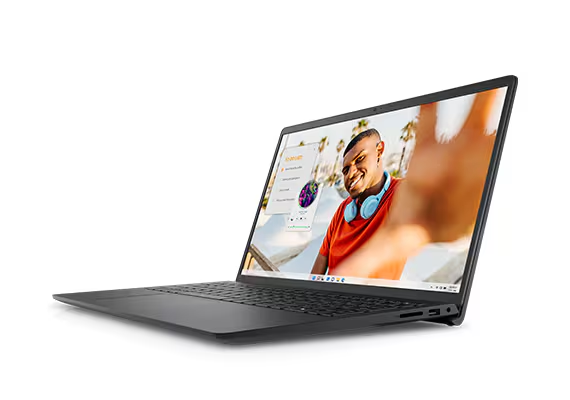
First on our list is the Dell Inspiron 15. This is my top pick if you want a great screen and a new processor. It is a solid choice for students and for home use.
Why Choose This Laptop?
The biggest reason to choose this laptop is its 120Hz Full HD display. A 120Hz screen is very rare at this price. It makes everything look very smooth. Watching videos, browsing, and even moving the mouse feels much better than on a normal 60Hz screen. It also has the latest 13th Gen Intel i5 processor.
Features You Will Get
- Processor: 13th Gen Intel Core i5-1335U
- RAM: 8GB DDR4 (One single 8GB stick, easy to upgrade)
- Storage: 512GB NVMe SSD (Very fast)
- Display: 15.6-inch Full HD (1920×1080) with 120Hz Refresh Rate
- Ports: 1x USB 3.2 Type-C, 1x USB 3.2 Type-A, 1x USB 2.0, 1x HDMI, 1x SD Card Reader
- Battery: 41Whr
- Weight: Around 1.62 kg
Pros and Cons
| Pros (Good Points) 👍 | Cons (Bad Points) 👎 |
| ✅ Best-in-class 120Hz smooth display | ❌ No backlit keyboard (typing in dark is hard) |
| ✅ Latest 13th Gen i5 processor | ❌ RAM is a bit slow (2666MHz speed) |
| ✅ Very easy to upgrade RAM (one slot is empty) | ❌ Battery life is just average (around 4 hours) |
| ✅ Good brand value and service from Dell | ❌ Build quality is all plastic |
| ✅ Comes with MS Office pre-installed |
Who Should Buy This Laptop?
You should buy the Dell Inspiron 15 3530 if:
- You watch a lot of movies and videos. The 120Hz screen is a treat for the eyes.
- You are a student who does browsing, makes reports, and attends online classes.
- You want a laptop that you can easily upgrade to 16GB RAM in the future by adding one more 8GB stick.
2. Acer Aspire Lite AL15-52H
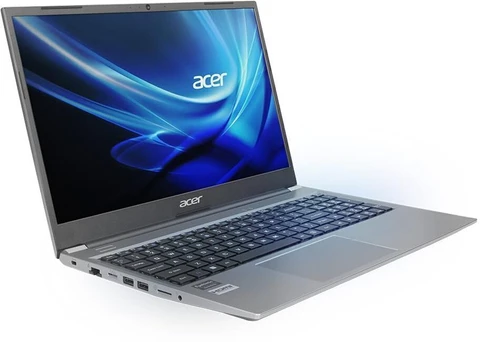
Next is a laptop that breaks the rule. You asked for 8GB RAM, but what if I told you that you can get 16GB RAM for the same price? This Acer Aspire Lite is a powerhouse and gives the best value for your money.
Why Choose This Laptop?
This is the only laptop on this list that offers 16GB of fast LPDDR5 RAM and a powerful H-series i5 processor. A H-series processor is much stronger than the U-series in other laptops. This makes it very good for heavy work like coding, opening many tabs, and even light video editing.
Features You Will Get
- Processor: 12th Gen Intel Core i5-12450H (H-series is more powerful)
- RAM: 16GB LPDDR5 (This is very fast RAM)
- Storage: 512GB NVMe SSD
- Display: 15.6-inch Full HD (1920×1080) IPS Display (Good colours)
- Ports: 1x USB 3.2 Type-C, 3x USB 3.2 Type-A, 1x HDMI, 1x RJ-45 LAN port
- Features: Backlit Keyboard, Metal Body (Top cover)
- Weight: Around 1.7 kg
Pros and Cons
| Pros (Good Points) 👍 | Cons (Bad Points) 👎 |
| ✅ 16GB RAM out of the box (Best value!) | ❌ Battery life is the biggest minus point (around 2-3 hours) |
| ✅ Powerful i5 H-series processor | ❌ RAM is soldered (you cannot upgrade it later) |
| ✅ Good IPS display with nice colours | ❌ Weaker Intel UHD graphics (not Iris Xe) |
| ✅ Premium metal body and backlit keyboard | |
| ✅ Has a LAN port for stable internet |
Who Should Buy This Laptop?
You should buy the Acer Aspire Lite AL15-52H if:
- You are a student in engineering or computer science who needs to run heavy software.
- Your work involves multitasking (opening 20+ Chrome tabs, Spotify, Word, Excel all at once).
- You want the most powerful laptop for under ₹40,000 and don’t want to worry about upgrading RAM.
- You use your laptop mostly at home or office near a charging point (because of low battery life).
3. ASUS VivoBook 15 X1504VA
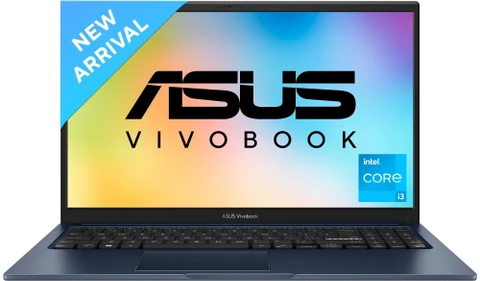
Last, we have the ASUS VivoBook 15. If you want a laptop that feels strong, looks premium, and has nice extra features, this is for you. It is tough and good for daily travel.
Why Choose This Laptop?
This laptop is built like a tank. It has a US MIL-STD 810H military-grade certification. This means it can survive small drops, high temperatures, and dust. It also has features like a fingerprint sensor (for easy login) and a webcam privacy shutter.
Features You Will Get
- Processor: 13th Gen Intel Core i5-1335U
- RAM: 8GB DDR4 (4GB soldered + 4GB in a slot)
- Storage: 512GB NVMe SSD
- Display: 15.6-inch Full HD (1920×1080)
- Features: Military-Grade Toughness, Fingerprint Sensor, Webcam Privacy Shutter, 180-degree flat hinge
- Ports: 1x USB 3.2 Type-C, 2x USB 3.2 Type-A, 1x USB 2.0, 1x HDMI
- Weight: Around 1.7 kg
Pros and Cons
| Pros (Good Points) 👍 | Cons (Bad Points) 👎 |
| ✅ Very strong military-grade build | ❌ Worst RAM upgrade! Max is 12GB (by replacing 4GB stick with 8GB) |
| ✅ Good security (fingerprint sensor, privacy shutter) | ❌ Screen is dim (not good for bright rooms) |
| ✅ Latest 13th Gen i5 processor | ❌ Battery life is average |
| ✅ 180-degree hinge is useful for sharing screen |
Who Should Buy This Laptop?
You should buy the ASUS VivoBook 15 if:
- You travel a lot or are a rough user. The strong build will keep it safe.
- You want extra features like a fingerprint sensor for fast and secure login.
- Your work is light (MS Office, browsing) and you know that 8GB RAM is enough for you (because upgrading it is very limited).
My Final Advice: Which One to Buy?
Here is a simple choice for you:
- For Best Media & Future-Proofing: Go for the Dell Inspiron 15 3530. That 120Hz screen is amazing for watching content, and you can add another 8GB RAM very cheaply to make it 16GB.
- For Best Power & Multitasking: Go for the Acer Aspire Lite AL15-52H. You get a powerful H-series CPU and 16GB RAM from day one. This is the best performance for the price, but be ready to keep the charger handy.
- For Best Build & Security: Go for the ASUS VivoBook 15. If you are a rough user and want a laptop that feels tough and secure, this is a good choice. But remember, you are stuck with 8GB (or max 12GB) RAM.